Internet Marketing, Search Engine Marketing, Social Media Marketing, EMail Marketing, Affiliate Marketing, Business Intelligence, Shopping Cart Abandonments, Conversions, Site Analytics, SEO, PPC
Who Needs Your Products?
HTTP Compression 101 & Enabling HTTP Compression + Caching on IIS – For FASTER WEBSITES
HTTP COMPRESSION MISSING-IN-ACTION (BEFORE)
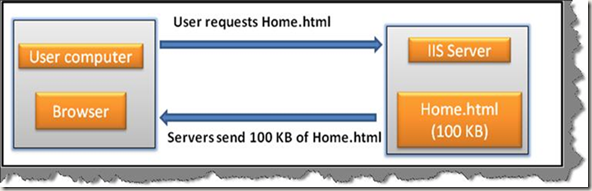
HTTP COMPRESSION IN-ACTION (AFTER)
WHAT IS HTTP COMPRESSION?
According to RFC 2616, Internet HTTP Compression is a method to send, from the Web server, an HTTP response message in compressed format to a requesting Web browser.
This technology assumes that the Web server is capable of encoding the outbound content and the Web browser is capable of (automatically) decoding the received content.
HTTP Compression saves transfer data volume and speeds ups Web page load time. This short overview discusses various aspects of HTTP compression, suggest proven solutions, and gives hints to further reading.
HTTP Compression is a publicly defined way to compress content (mostly textual) transferred from Web servers across the world wide Web to browsers. The impact of compression is that the number of transmitted bytes is reduced and thus a higher performance is gained. HTTP Compression uses public domain compression algorithms to encode HTML, XML, JavaScript, CSS and other file formats at the server-side. This standards-based method of delivering compressed content is built into HTTP/1.1, and all modern Web browsers support the HTTP/1.1 protocol, i.e. they can decode compressed files automatically at the client-side. This means, in particular, that no additional software or user interaction on the client-side is required.
HTTP REQUEST FLOW
Client sends request to server
When a Web browser loads a Web page, it opens a connection to the Web server and sends an HTTP request to the Web server. A typical HTTP request looks like this:
GET /index.html HTTP/1.1
Host: www.http-compression.com
Accept-Encoding: gzip
User-Agent: Firefox/5.0
With this request, the Web browsers asks for the object "/index.html" on host "www.http-compression.com". The browser identifies itself as "Firefox/5.0" and claims that it can understand HTTP responses in gzip format.
Server sends compressed response to client
After parsing and processing the client's request, the Web server may send the HTTP response in compressed format. Then a typical HTTP response looks like this:
HTTP/1.1 200 OK
Server: Apache
Content-Type: text/html
Content-Encoding: gzip
Content-Length: 12345
[GZIP COMPRESSED DATA]
With this response, the Web server tells the browser with status code 200 that he could fulfil the request. In the next line, the Web server identifies itself as Apache. The line "Content-Type" says that it's an HTML document. The response header "Content-Encoding" informs the browser that the following data is compressed with gzip. Finally, the length of the compressed data is stated.
COMPRESSION FORMATS
deflate
More information:
http://www.gzip.org/zlib/
http://en.wikipedia.org/wiki/DEFLATE
gzip
More information:
http://www.gzip.org/
http://en.wikipedia.org/wiki/Gzip
ENABLE HTTP COMPRESSION @ WEBSITE LEVEL
To more efficiently use available bandwidth, enable IIS HTTP compression. HTTP compression provides faster transmission time between compression-enabled browsers and IIS, regardless of whether your content is served from local storage or a UNC resource. You can compress static files and application response files. Compressing application response files is usually called dynamic compression.
Go to inetmgr > WebSites > Properties > Go to Service Tab
a. Select the checkbox – Compress application files (Dynamic files compression)
b. Select the checkbox – Compress static files (Static files compression)
Also, you can specify where to log/store temporary compressed content and the capacity of the temporary directory… Default value is 95MB, you can increase it based on the size of your static contents.
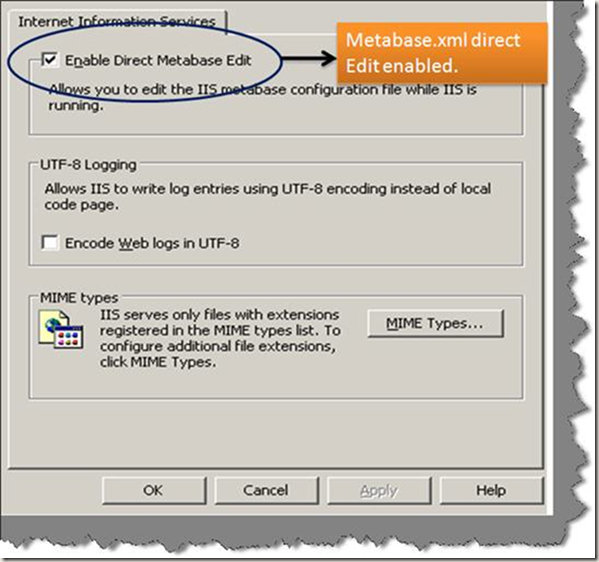
CONFIGURE IIS METABASE – DIRECT MANUPULATION OF METABASE XML
CONFIGURE IIS METABASE COMPRESSION PARAMETERS – USING SCRIPTS
IMPORTANT – Please make sure you follow these steps for any METABASE CHANGES
- STOP IIS
- Take BACKUP of METABASE XML
- Make changes as outlined below for IIS (using CSCRIPT)
- RESTART IIS
Run these commands – to configure static & dynamic compression parameters for both GZIP & Deflate compression schemes.
| Note – you can dump below script commands in a batch file and execute it at command prompt on your Windows server cscript C:\Inetpub\AdminScripts\adsutil.vbs Set W3SVC/Filters/Compression/Parameters/HcDoStaticCompression TRUE |
5. Go to inetmgr > Default WebSite > Right click Properties > HTTPHeaders Tab
Social Media–What Does These Terms Mean To You?
Blogs – can typically thought of as a tool to organize your thoughts, status, ideas, news, and almost everything else that can be communicated in chronological order. This clearly means more permanence than emails, since emails can have tons of wanted + unwanted contents, difficult to keep your inbox organized, limited search abilities, etc… Blogs are one of the most effective means to communicate to the users of your niche or community.
Podcast – Written words turned into live audible or visual communication that encourage different types of learning are called podcasts. Typically they are in portable formats and hence one of the important features is you can listen or watch the podcasts while on road or waiting on airport, or at your favorite Starbucks location…Podcasts are normally split by subject, and hence are normally delivered in small chunks v/s a very large episode… Usually few minutes to an hour or so. This helps the users decide exactly which topic they are interested in and hence helps maintain their library clean.
Social Network – is the tool you want to use if you are looking to replace your intranets & corporate directories, and promote non-e-mail conversation channels within and outside the organization. The key purpose is bring the like-minded people around the globe together thru shared interests, no organizational center, and with a sense of group for what is important and beneficial to the community.
Social Bookmarking – tools help entire groups to learn about new articles, tools, and other web resources instead of being beneficial to only a single machine, or browser, or human. One of the great examples is StumbleUpon.
to be continued…
Remarketing Using Email & Social Media
REGISTER NOW - Remarketing Using Email & Social Media
Thursday, October 13th
11am PDT | 2pm EDT | 7pm BST
Everyone abandons shopping carts and online forms -we’ll show you how easy it is to recover them. In this webcast, we'll be sharing tips on how to recover up to 50% of your website abandoners by triggering real-time remarketing campaigns through email and social media using SeeWhy’s Conversion Manager.
You'll also learn:
• How to calculate the monetary value of your abandonment problem
• What results the top eCommerce companies are getting and what you can expect
• Best practices on how to optimize your shopping cart recovery campaigns
• How to leverage ESP's and social media to help
Source
[Webcast] Conversion Tactics: Rethinking abandonment
What you'll learn:
- Why visitors abandon
- How abandonment is part of the normal purchase cycle
- How to generate incremental revenues from abandoners
Why first time purchasers are a critical segment that need special attention
Customer Experience Management for Online Marketers Guest speaker: analyst Tony White
Analyst Tony White talks about Customer Experience Management (CXM), a new and very effective form of online marketing when used well. As the field of Online Marketing is changing rapidly (e.g. more and more channels) and your customers expect personalization in almost every interaction, creating a positive online experience is crucial. CXM aims to design those experiences that meet the growing demands of your customers and leverages the relationship with them at the same time.
Sign up now for this free webinar on Thursday 8 September! (limited seats available).
| Thursday September 8th 1:00 to 1:45 PM EST 10:00 to 10:45 AM PST |
Agenda:
- What is CXM and how are online marketers using it?
- What goals does CXM enable marketing departments to achieve?
- Meeting rising customer demands
- Integrating the growing number of online channels
- CXM implementation best practices
Content excerpt from marketing email from GXSoftware
SOCIAL MEDIA TOOLS FOR SUCCESS–PART II
Missed Part I – Check this link Social Media Tools for Success - Part I
In Part II – we will introduce you to the Software tools that you will need for a successful social media marketing/communication.
Graphics and Photo Editing Software – Graphics & Photo editing software are basic necessities when it comes to cropping an image or adjusting the image settings like brightness, contrast, applying special effects to the photo/images/logos. The intent is not to become a graphics designer, but rather be able to use basic features that can make your graphics look better when you publish the content. It shouldn’t at least looks like a work of an amateur.
Video Editing Software – Assume you shot a video at a particular seminar or event and would like to publish it on social network, with an assumption that there might be some moments or clips that you would like to take off of the video or add some TEXT content, captioning etc… to the video. You are looking forward to a good, easy to use video editing software at your disposal for the kind of task. Google the keywords and it will lead you to tons of Free & Price-based video editing software.
Audio Editing Software – You an use Garage Band for Mac or Audacity for the PC for editing audio. We’re suggesting Audacity since it is very easy to use and needs very little to no training.
CRM (Customer Relationship Management) Software – In the world of marketing, Contact list or Customer list is one of the most important assets and you need to use a system to track and organize the sales and marketing activities.
Browser with Social & Google Plug-ins – Browsers that support and are equipped with toolbar support and plug-ins from social media world are able to automate and speed-up a lot of activities online. FireFox and IE are the most plug-in friendly browsers, especially FireFox.
With this we will conclude Part II – In Part III – we will introduce you to the the Social Networking terms and tools.
Missed Part I – Check this link Social Media Tools for Success - Part I
To Be Continued…
Floating Social Media Share Buttons On Blogger
In this post we will publish a simple Javascript code snippet that will help you launch floating social sharing buttons/links on the left of your blogger blog.
<!-- Floating social media buttons by InternetMarketing-readme.pricemaniacs.com--><style>
#floatingbuttons{background:#F9F9F9;background:-webkit-gradient(linear, left top, left bottom, color-stop(0, #fff), color-stop(1, #F9F9F9));background:-moz-linear-gradient(top, #fff, #F9F9F9);border:1px solid #ccc;float:left;padding:0 0 3px 0;position:fixed;bottom:15%;left:0;z-index:10;border-radius:0 5px 5px 0;box-shadow:2px 2px 5px rgba(0,0,0,0.3);} #floatingbuttons .floatbutton{float:left;clear:both;margin:5px 4px 0 4px;} .addbuttons{clear:both;text-align:center;padding-top:5px;} .addbuttons a span.getfloat, .addbuttons a span.sharebuttons{color:#000;background:none;font-family:arial, sans-serif;display:block;font-size:9px;font-weight:bold;text-decoration:none;line-height:11px;} .addbuttons a:hover span{color:#fff;background:none;text-decoration:underline;}</style>
<div id='floatingbuttons' title="Share this post!"><script src="http://connect.facebook.net/en_US/all.js#xfbml=1"></script><script type="text/javascript"> (function() { var s = document.createElement('SCRIPT'), s1 = document.getElementsByTagName('SCRIPT')[0]; s.type = 'text/javascript'; s.async = true; s.src = 'http://widgets.digg.com/buttons.js'; s1.parentNode.insertBefore(s, s1); })(); </script><!-- Medium Button --><script src='http://platform.twitter.com/widgets.js' type="text/javascript"></script><div class='floatbutton' id='facebook'><fb:like layout="box_count" show_faces="false" font=""></fb:like></div><div class='floatbutton' id='stumbleupon'><script src="http://www.stumbleupon.com/hostedbadge.php?s=5"></script></div><div class='floatbutton' id='digg'><a class="DiggThisButton DiggMedium"></a></div><div class='floatbutton' id='twitter'><a href="http://twitter.com/share" class="twitter-share-button" data-count="vertical" >Tweet</a></div><div class='floatbutton' id='linkedin'><script type="text/javascript" src="http://platform.linkedin.com/in.js"></script><script type="in/share" data-counter="top"></script></div><div class='sbutton' id='gplusone'>
<script type="text/javascript" src="http://apis.google.com/js/plusone.js"></script>
<g:plusone size="tall"></g:plusone>
</div>
<div class="addbuttons"><a href="http://internetmarketing-readme.pricemaniacs.com/floating-social-media-share-buttons-on-blogger-side/" title="Add floating social media share buttons to your blogger blog!"><span class="getfloat">Get floating</span><div style="clear:both"></div><span class="sharebuttons">share buttons</span></a> </div> </div><!-- end Floating social media buttons by InternetMarketing-Readme.pricemaniacs.com -->
Just add the code (above in red) into your blogger design/layout by following these steps:-
- Login to your dashboard
- Go to Design
- Edit layout
- Click on add gadget
- HTML/Javascript
- Add the above mentioned code in the HTML textbox.
Social media tools for success–PART I
Hardware Tools
Smart phone with a Data plan – Social media is becoming more mobile every minute. You need your marketing, executive and management staff equipped with a start of the art smart phone with the right data plan that can help the new marketing generation stay in touch and connected with the social world.
Notebook or Tablet Computer – A power & portable notebook, netbook, or a tablet is vital for communicating even from a remote location.
Mobile Broadband Solution – If you are travelling frequently and are carrying your laptop or netbook it makes perfect sense to go for a Mobile broadband service/solution so as you can be hooked to the net from anywhere. Every major mobile carrier has a mobile broadband solution. Alternatively, you can sign-up for Boingo Wi-fi membership if you want to take advantage of 1000’s of wireless internet hotspots in airports, hotels, restaurants, and beyond.
Video Camera + Webcam– Get a video camera that is user friendly, light, highly compatible with multiple operating systems, easy to transfer/upload videos to PC or onto social networking sites such as Youtube, Facebook videos, etc… The major factor to consider is easy of use and distribution. Make sure your laptop is equipped with a webcam.
Good microphone – Invest in high-quality & easy-2-use microphone. You might be recording seminars, client interviews, expert comments, testimonials, podcasts and tons of other means of capturing audio content on the run.
With this we will conclude Part I of this series. In Part II – we will introduce you to the Software tools that you will need for a successful social media marketing/communication.
To be continued…